

nábd Care

HR case management around SAP SuccessFactors

For organisations running SAP SuccessFactors. One place for employees to get answers, raise requests and complete life cycle activities. Clear ownership for HR.

Who it's for

One condition

You run SAP SuccessFactors, live or nearing go-live, and it does not matter which partner implemented it. Your tenant stays the system of record. Care reads employee data from it through nábd Core, the platform's shared foundation, and holds no second copy.

Core is included with the module; you do not buy it separately. The whole layer runs on SAP Business Technology Platform (BTP), SAP's own platform for extending its products, so nothing is added inside SuccessFactors that you would have to carry through an upgrade.

How nábd Core works →

What it does

Six things nábd Care does

One place to ask

Help, tasks, equipment, learning and life cycle actions in one place, inside the flow of work rather than beside it. Articles surface as an employee types, so a question is answered before it becomes a request.

What you can see: how many requests were answered by an article before anyone in HR was involved.
The coordination work disappears

Reusable journeys hand tasks to HR, IT, the manager and the employee without anyone assembling the list. Requests route by topic, entity, location or team, with no manual triage. When an approver is away, delegation and backup ownership keep work moving.

What you can see: how often a request was reassigned by hand.

Every request has an owner and a clock

Each request carries an owner, a priority and a response and resolution target. Work escalates before a commitment is missed, not after the employee chases. Sensitive HR and payroll cases carry restricted visibility and protected history.

What you can see: response and resolution against target, and where they slipped.

Handoffs stop depending on memory

Onboarding runs from offer to day 90. Probation conversations are planned at 30, 60 and 90 days, with goals and feedback captured. Equipment is triggered by the life cycle, learning is assigned by role, and feedback is requested at the moments that matter.

What you can see: overdue activities, per journey.

Start with one journey

You begin with the capabilities you choose and extend by priority, entity or maturity. There is no platform decision on day one, and the next journey inherits the connection, governance and data the first one uses.

What you can see: how the first journey is used before you decide on the next.

Exits close cleanly

A tailored journey per exit type, with clearance across HR, IT, Finance and the manager. Access removal, equipment return, handover and approvals are governed to closure rather than assumed complete. Exit feedback is collected as part of it.

What you can see: clearance completion and on-time access removal.

The product

The front door, as your employees see it

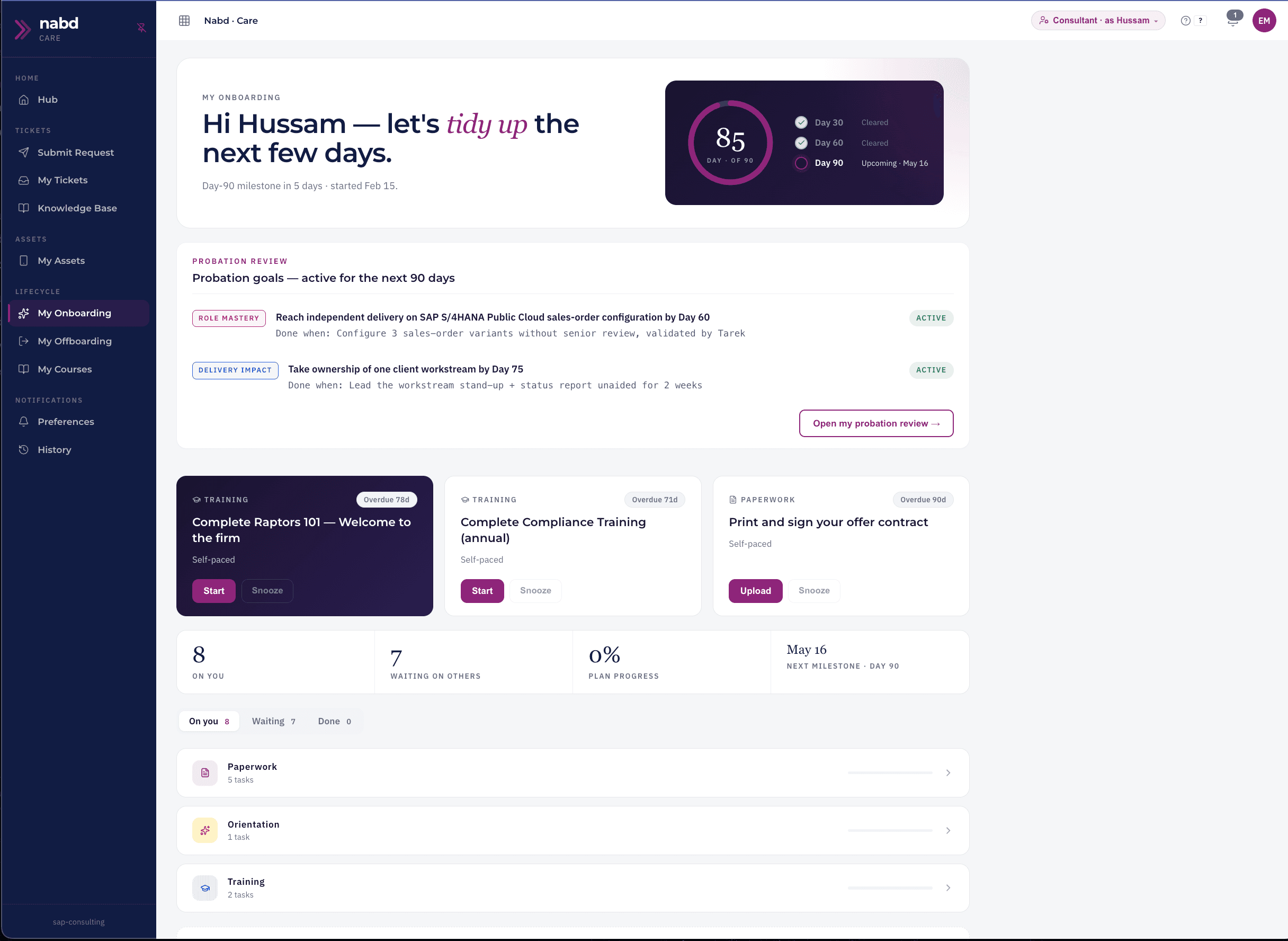
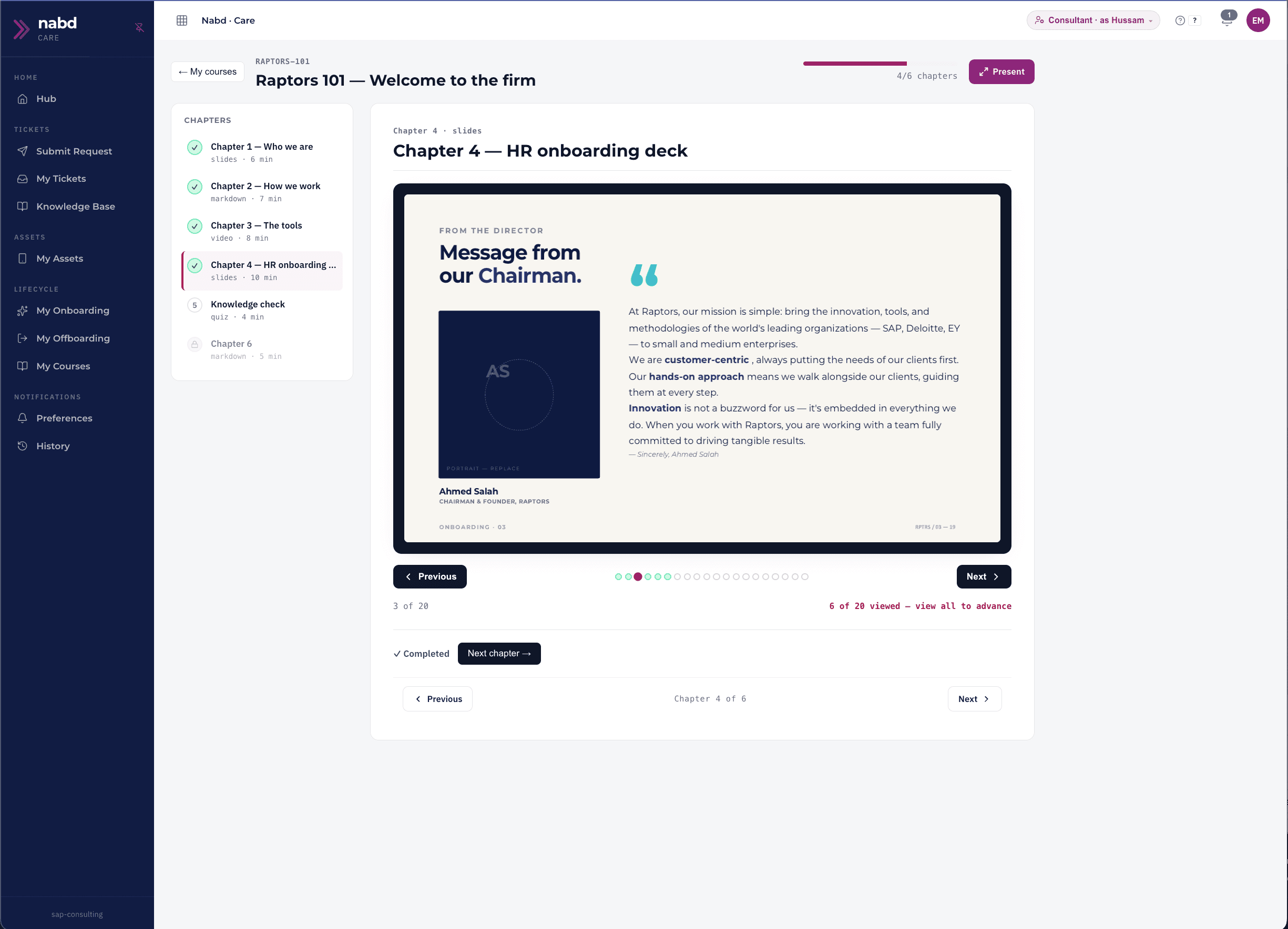
Care runs in Arabic and English. The knowledge base and the service catalogue are written in both, so an employee asks in the language they work in. The three views below are the ones an employee and an HR agent open most.

nábd Care onboarding view showing day 30, 60 and 90 milestones, probation goals and outstanding onboarding tasks.
An onboarding journey: day 30, 60 and 90 milestones, probation goals and the tasks that remain, visible until complete.
nábd Care learning view showing a course with its chapters and completion progress.
A learning view: a course assigned as part of onboarding, with each chapter tracked to completion.

Screenshots show demonstration data.

The employee life cycle

Linked from before day one to the last day

Six journeys, each with an owner, a target and a record. What is lost today is lost in the handoffs between them, so the handoffs are what Care connects.

Before day one

Equipment requests and preparation steps are triggered by the hire, with custody recorded from the first issue.

Onboarding

Offer to day 90, across HR, IT, the manager and the new hire. Paperwork, access, equipment and learning stay visible until complete.

Probation

Conversations at 30, 60 and 90 days, with goals, feedback and outcomes captured, so a confirmation decision rests on evidence.

Learning

Learning assigned by role, entity or journey. Renewal triggers and reminders arrive before mandatory training lapses, and completion is recorded.

Listening

Feedback requested around onboarding, exits and other key moments, with privacy settings that make candour possible.

Offboarding

Clearance across HR, IT, Finance and the manager, governed to closure: access removed, equipment recovered, handover done, approvals recorded.

The record of each journey stays with the employee's SAP SuccessFactors profile as the system of record. Nothing about a hire, a review or an exit lives only in an inbox or in one person's memory.

Questions

Five things people ask first

We already paid for SAP SuccessFactors. Why add more?
You bought a system of record, and it is doing that job. What Care addresses is the work around it: routing a request to an owner, getting equipment ready before day one, keeping probation conversations on schedule. That work is happening today, in inboxes and chat threads. The question is not whether to pay for it. It is whether it has an owner and a record.
Our employees will not use another tool.
That is the right concern, and it is why the front door sits inside the flow of work rather than beside it, with articles appearing as someone types instead of waiting to be searched for. Start with one journey and watch how it is used before you extend.
What about sensitive cases, such as payroll disputes and grievances?
Confidential handling is built into requests rather than added later: restricted visibility, protected history, and routing that keeps a sensitive case out of the general queue. Who can see a case is decided when it is raised, not after.
Does it work in Arabic?
Yes. The knowledge base and the service catalogue are written in Arabic and English, and an employee asks in whichever they work in.
We already run nábd Pay. What does adding Care involve?

Care runs on the same nábd Core, so it inherits the connection to your tenant that nábd Pay already uses. There is no new integration project and no new vendor. The first decision is which journey to start with.

About nábd Pay →

Tell us which journey costs you most today

A call with the team that built nábd Care. Bring the request or the handoff that goes wrong most often, and we walk through how it runs with an owner and a record.