

nábd Pay
Egyptian payroll from your SAP SuccessFactors data
For organisations on SAP SuccessFactors Employee Central paying people in Egypt. Your people data arrives once. Egypt's statutory rules are maintained for you.
Who it's for
Two conditions
You run SAP SuccessFactors Employee Central, and you pay people in Egypt. Employee Central is where your people data lives, so nábd Pay does not run without it. The data reaches payroll through nábd Core, the platform's shared foundation, and payroll reads it rather than keeping its own copy. Egypt is the only country nábd Pay supports today.
What it does
Six things nábd Pay does
Your employee is entered once
Hires, promotions, salary changes, bank details and leavers arrive from Employee Central through nábd Core. Employees are read-only inside nábd Pay, so there is no second place a person can be maintained and nothing to reconcile on payday.
Egypt's rules are maintained for you
Egyptian tax, social insurance, end-of-service and labour-law obligations are part of the product. When the government changes them, Raptors updates the system. Periods you have already filed keep showing exactly what was filed.
Statutory filings come out filled
Social insurance forms are produced as Arabic PDFs in the authority's own layout. The salary tax filing comes out in the authority's coded format, per legal entity. Each form is checked as fillable before it is produced. Your team submits them.
Errors surface before payday
A missing national ID, no bank account on file, no salary assigned: a run that would produce a wrong payslip is stopped before it runs. You decide which checks stop a run and which only warn. Two people approve before anyone is paid.
The accounting entry posts itself
Each pay element is mapped once to an account. From then on the entry is built, confirmed to balance, and posted to SAP S/4HANA with its reference against the period, or exported to whichever ledger you run. The same entry cannot post twice.
Evidence accumulates on its own
Every change, approval and payment is recorded as it happens. Reports are organised by who needs them: the authority, Finance, your auditor. Bank account numbers are masked on screen and every file download is logged.
The product
The run, as you see it
In Arabic, nábd Pay runs as a right-to-left interface, not as translated labels on a left-to-right screen. The three views below are the ones your payroll lead, your finance director and your SAP lead each open most.
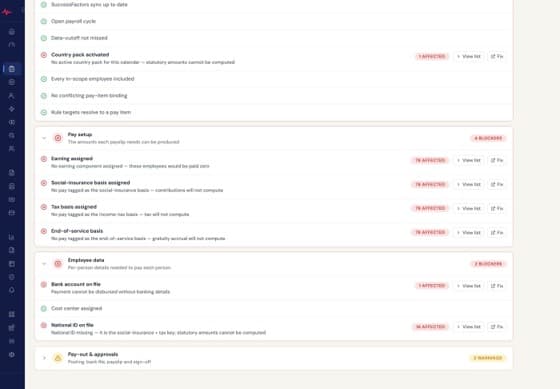
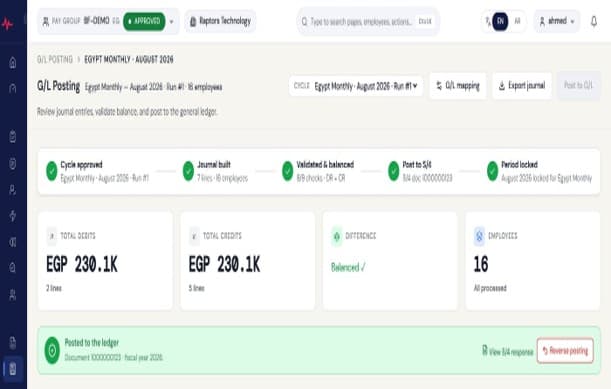
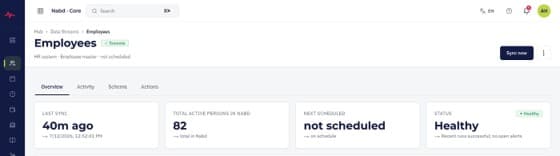
Screenshots show demonstration data.
How a run closes
Checked before it runs. Closed once it is paid.
Six control points sit between opening a period and paying it. Each one has to clear before the next can begin.
Readiness check
Missing IDs, bank accounts and salaries are found before the period moves.
Cut-off
The period's data is fixed. Changes that arrive later are picked up as back-dated corrections and settled across every period they touch.
Dry run
The full calculation runs without committing, so the numbers can be read and questioned first.
Two approvals
Two people approve the run before it can be paid. Neither can do it alone.
Ledger posting
The accounting entry is confirmed to balance and posted to SAP S/4HANA, or exported to your ledger.
Permanent close
The period locks. What was paid is what the payslips and the filings show.
Then payslips reach your employees on their own Employee Central profile, the bank file is built to your bank's layout and validated against paying a period twice, and the statutory filings come out filled.
Questions
Four things people ask first
What happens when the rules change in January?
Egypt's tax, social insurance and end-of-service rules are maintained with the product and updated when the government changes them. Periods you have already filed keep showing exactly what was filed, so an update does not rewrite history.
Does nábd Pay file with the authority for us?
No. What nábd Pay produces is the filings, filled: the social insurance forms in the authority's own Arabic layout, the salary tax filing in its coded format. A person on your team submits them. That distinction is a legal one, and we keep it.
We have entities outside Egypt.
Egypt is the only country nábd Pay supports today, and we will not tell you otherwise. If payroll outside Egypt is the requirement that decides this for you, say so when you book a call and we will tell you plainly whether nábd Pay fits.
We don't run SAP S/4HANA.
Then the accounting entry exports into whichever ledger you do run. Native posting to SAP S/4HANA is an advantage where it is in place, not a requirement.
Show us how your payroll runs today
A call with the team that built nábd Pay. Bring your pay items and your close calendar, and we walk the run through against them.